Back about a year ago, I went through the rigors of getting a FedOne Wave server installed. Although the Wave Protocol had been released at Google I/O in May 2009, there was not much excitement without being able to federate with the development sandbox. The other issue was nobody had access till the preview lauched, except in the sandbox, and all the invite hell that followed.
Once Google opened up federation on wavesandbox.com many of us started trying to run our own servers so we could test out this cool new federation protocol. Most of the setup was pretty easy but certificates, which are required for federation with Google's Wave Sandbox, can be quite the ordeal to get working properly. Without completely re-outlining every step, I thought I would outline my setup since I recently moved my wave setup to another server and had to walk thought the steps again, refreshing my memory.
Server OS: Ubuntu 10.10 Server:
1 - Get necessary packages to setup the Wave-in-a-box environment:
$: sudo apt-get install mercurial ant default-jdk mongodb eclipse
NOTE: With Ubuntu 10.10 you need to get the repository for Java first:
$: sudo add-apt-repository ppa:sun-java-community-team/sun-java6
$: sudo apt-get update
2 - Get current Wave-in-a-Box source:
$: mkdir wave-development
$: cd wave-development
$: hg clone https://wave-protocol.googlecode.com/hg/ wave-protocol
3 - Build Wave-in-a-Box:
$: cd wave-protocol
$: sudo ant
Building Wave-in-a-Box is pretty straight forward however there are a few things to know if you intend to federate with other Wave-in-a-Box instances, especially when authentication is used. Two major components, not mentioned above, are required to establish secure signing between servers and to allow some of the live collaboration. You will need to install an XMPP server and have your certificates built for the domain you are going to use for federation. I also needed to add a few things to my host file and setup SRV records on my domain registrar to get all to work correctly.
Below are some links to help you in getting all of Wave-in--Box setup and working:
Setup: http://www.waveprotocol.org/wave-in-a-box/setting-up
Building: http://www.waveprotocol.org/wave-in-a-box/building-wave-in-a-box
Installation: http://www.waveprotocol.org/code/installation
XMPP step by step (Openfire): http://www.waveprotocol.org/federation/openfire-installation
Federation Certificates: http://www.waveprotocol.org/federation/certificates
Certificate Issuer: http://www.startssl.com/
A great step by step by Ralf Rottman: http://www.24100.net/2009/11/federate-google-wave-sandbox-with-your-own-fedone-server/
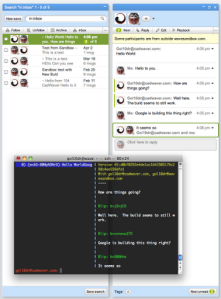
Once you are setup you can start trying out your newly, self-hosted Wave server. WiaB comes with two client interfaces. The first is a terminal client located in the "wave-protocol" directory which can be used by typing:
./run-console-client.sh <username>
Once inside you can type "/help" to see the available commands.
The other interface is web-based and works rather well. This is the area that is under major development to bring it to parity with Google Wave's web UI. By default it is accessible on port 9898 so you can access it by visiting http:/yourdomain.com:9898.
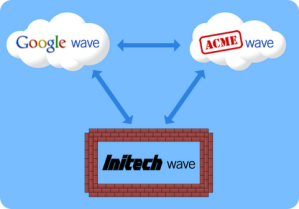
Currently Federation is only open on other WiaB instances in which it is enabled and the developers sandbox at http://wavesandbox.com. If you just want to try to set WiaB without federation, certificates and XMPP servers are not necessary. You can then setup the server and install and build the source and run the server. There is currently a config file for no federation that will allow you to test out the web UI quickly with very little headache. Federation is key to the success of this platform in the long run so if you are serious about sustaining a Wave server, get federation running too! ~Lou
A Few Images:


If you have questions or run into any issues, please leave a comment or send me a message:
Twitter: @gol10dr
Wave: gol10dr@googlewave.com